Work through a practice set, step by step
Pick a subject and a practice set, use the problem-solving steps and the hint ladder, and see how you went at the end.
No account needed. This works in the guided preview, with sample data saved only on your device. Signed in, your progress saves to your account. Learners earn +10 Think Points for finishing the walkthrough in the app.
Step by step
Where: Learn, then a subject page in Learn, then a practice set in Learn.
Pick a subject
Choose a subject. Subjects with a practice set start at question 1; for the others you can ask Ponder. Try Maths.
Pick a practice set
Each set is a short run of questions for your year level. Tap “Start at question 1”.
Carry on or start again
If you were partway through a set, Ponder asks first: carry on where you left off, or start again from question 1.
Five steps to solve it
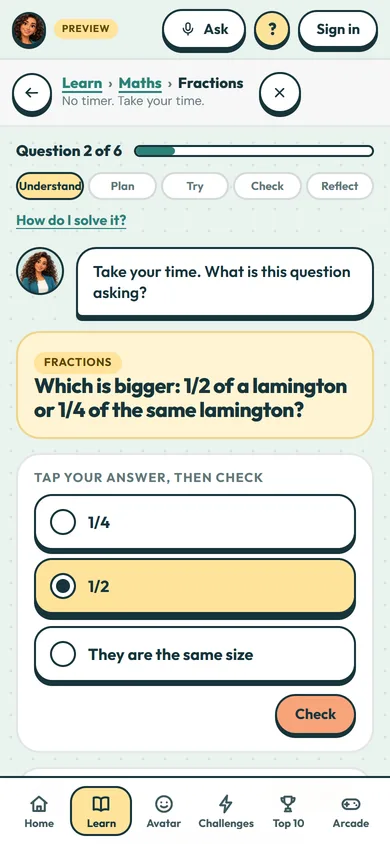
Every question uses the same steps: Understand, Plan, Try, Check, Reflect. Tap “How do I solve it?” any time to see what each step means.
Read the question
Start by understanding the question. Take your time: there’s no timer, and a wrong answer never loses points.
Your hint ladder
Hints match the steps. Hint 1 helps you understand the question, hint 2 helps you plan a way to work it out, and hint 3 shows a worked example.
Ask for one hint
Do it with me: tap “I’d like a hint” to open the first rung.
Read the hint
A hint is a nudge, not the answer. You only get as much help as you ask for.
Answer it your way
Some questions have answers to tap, some need a number or a word, and some ask you to explain your thinking in a sentence. Have a go, then tap Check.
Check, then move on
If a tapped answer isn’t right, Ponder points out the likely mix-up, not the answer. When you get it, Ponder shows why it works. Tap “Next question” to keep going.
Where you are
This shows which question you’re on. If you leave, your place is saved, and next time Ponder asks whether to carry on.
Results at the end
Your score, the strategies you used, Think Points, your streak and a quick “how did that feel?” all come on one screen at the end of the set.
 (open the full-size screenshot)