Create your Ponder account
Choose Individual, Family or School, pick Essentials or Plus and how you pay, say how many people it’s for, make your login, then set up your family or school.
Before you start. Children don’t need an email address or password: you add them yourself. Not ready to pay? Explore Ponder first for free, with example data. Schools can start with a 30-day pilot (an access code or an invoice).
Step by step
Where: Create account.
Pick your account type
On the welcome screen, tap Create account. Then pick Individual (one grown-up and one learner), Family (two grown-ups and two children, with room for more), or School or organisation.
Continue
Tap Continue to choose your plan. Back is always at the top if you change your mind.
Essentials or Plus
Essentials has practice sets, games, Ponder Quest and progress, without AI. Plus adds Ponder’s AI: Ask Ponder, AI hints and learning plans. Choose Monthly or Annual above the cards (annual is 12 monthly payments in one), and tap “See what’s included” to compare.
Next: who it’s for
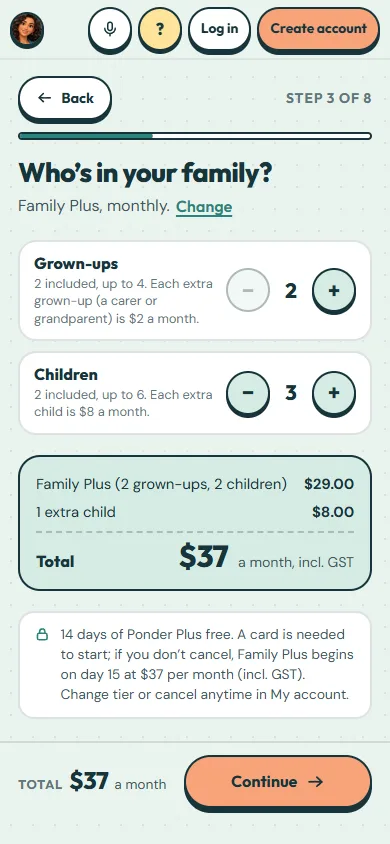
Tap Continue. A family then chooses how many grown-ups and children, and a school how many students. Individual goes straight on to the login.
Who it’s for
For a family, add grown-ups and children with the + and − buttons. For a school, type the number of students. The total updates as you go.
Your total
The total shows every line, including GST, and sits beside Continue. Nothing is charged until paid plans open.
Your login, then set-up
Next you make your login with Google or your email and a password. Then Ponder walks you through your family (children, the other grown-ups, children’s own devices) or your school (classes, teachers, students). Optional steps have “Do this later”.
 (open the full-size screenshot)